
Open Loyalty Platform
Open Loyalty Platform is Shift4's standardized way for 3rd-party loyalty providers to plug their programs into our ecosystem, so that merchants can use loyalty features (e.g. points, balances, redemptions) across Shift4 POS without custom one-off integrations.
The Open Loyalty API Specification describes the exact set of loyalty endpoints your system must expose—such as how we call you for member lookup, rewards, and redemption—along with the required request/response formats, error handling, and security requirements.
Together with the Installation Flow, Subscription events, and HMAC authentication requirements, the Open Loyalty API Specification defines the complete integration contract.
Once implemented and certified, your loyalty program can be seamlessly used by merchants in Shift4 POS.
Open Loyalty API Specification
The Open Loyalty API Specification defines the contract your system must implement. It describes how Shift4 will call your service for loyalty operations and how your system must respond.
View Open Loyalty API Specification
Installation Flows
We offer multiple installation flows. The appropriate flow depends on how much onboarding or validation your integration requires.
For loyalty integrations, we typically recommend INSTALLATION_REQUEST, as it provides structured onboarding and merchant data exchange. Using the installation request ID you get via webhook message, you can retrieve full installation details from our API, including restaurant information and the externalId provided by the merchant to link their existing account in your system.
Regardless of the chosen flow, your system must explicitly notify us when setup is complete. Until installation is finalized on your side, POS traffic will not be routed to your API.
Security
All Open Loyalty API endpoints must be protected using HMAC-based authentication. This ensures that requests originate from us and that payload integrity is preserved.
The same credentials are used both to validate incoming requests from us and to sign requests you send back.
If you require a different authentication model, please contact us to discuss feasibility.
Webhooks and API Endpoints
Depending on the chosen installation flow you will need to provide a webhook endpoint to receive installation events. This endpoint may be hosted separately from your Open Loyalty API implementation.
Webhook events are asynchronous notifications. In contrast, Open Loyalty API calls from POS require synchronous responses.
Loyalty on the POS
The Open Loyalty API allows different types of approaches to loyalty. The loyalty provider should choose the approach that best fits their need.
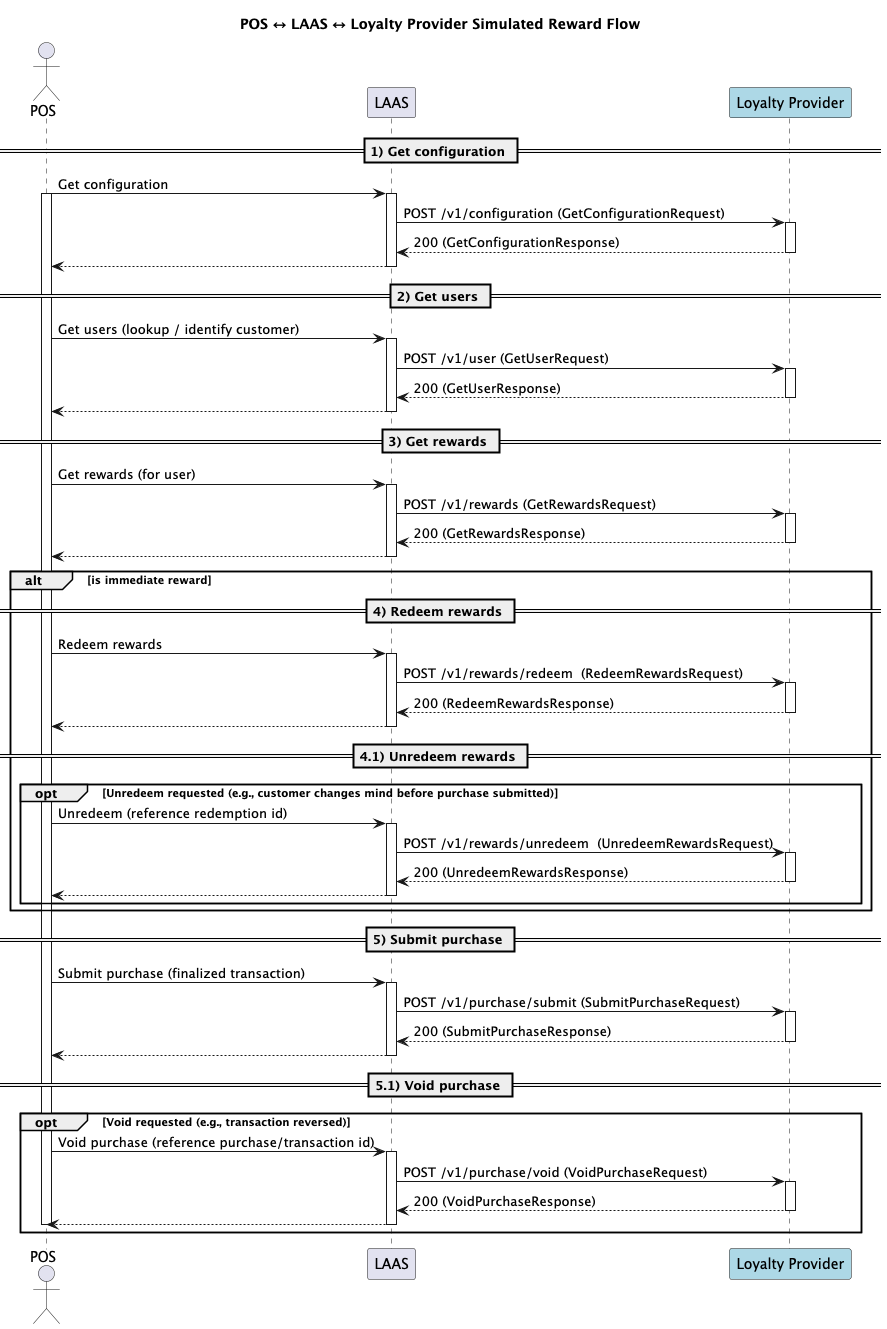
At a high level, the POS interacts with the loyalty provider as highlighted in the following diagram:
Configuration
The first step is to retrieve the configuration from the loyalty provider. This allows the POS to make further decisions as to how it will be behaving. The possibilities are explained in the "Loyalty Flows" section.
Member lookup
When the staff member selects to add a loyalty member to a ticket, the POS will call the loyalty provider to retrieve the profile information.
Rewards
The POS will retrieve a list of applicable rewards for the member when the customer is ready to choose a reward to apply. When a reward is selected, the POS will apply a discount corresponding to the reward. The loyalty provider can specify if the resulting discount applies to the whole order or to a single item. Depending on the reward setup, the POS may inform the loyalty provider any time a reward is added or removed.
Order-Level Rewards: Applied During Tender
These rewards apply to the entire check/ticket as a whole. The staff member applies them at the payment screen.
Examples:
- "$5 off your order"
- "10% off your entire purchase"
- "$10 off orders over $50"
- "15% loyalty discount"
Item-Level Rewards: Applied During Order Building
These rewards are tied to specific products on the menu. The staff member applies them by selecting the item in the order overview.
Examples:
- "Free medium coffee"
- "Buy one pizza, get one free"
- "10% off any pasta dish"
- "$2 off a smoothie"
Points Issuance
When closing the order, the POS will send the content of a loyalty order, including the applied rewards, to the loyalty provider. This is when the loyalty provider can issue points to the member for their visit.
Purchase void
If a loyalty order gets refunded, the loyalty provider will be informed so that the original points issuance can be reverted.
Loyalty Flows: How to influence behavior of the POS.
Loyalty providers using the Open Loyalty API can define which of the allowable behaviors the POS will follow. This is done either through the settings provided in the posFlow object within the response to the /configuration endpoint, or within the reward information returned in the response to the /rewards endpoint. Refer to Open Loyalty API Specification for each endpoint's details.
How do the provider rewards translate to discounts on the POS?
The posFlow setting "rewardToDiscountConversion" defines how discounts are created when a reward is applied.
- The loyalty provider can decide if a reward is converted to an existing POS discount through the use of a common reference. The POS will validate that the discount can be applied to the order or item.
- The loyalty provider can decide to compute the amount to discount from the order or the item. In that mode, the POS will create an open discount for the monetary value computed by the loyalty provider.
Should the POS send non-loyalty transactions to the loyalty provider?
The optional posFlow setting "sendNonLoyaltyCheck" defines if the POS will send tickets that are not associated to a loyalty member to the loyalty provider. If this value is not set, non-loyalty tickets will not be sent.
Simulated vs Immediate Rewards?
Each reward returned in the /rewards endpoint may contain a field indicating if the reward is to be treated as a simulated or an immediate reward.
- For an immediate reward, every time the reward is applied, the POS will call to the /rewards/redeem endpoint. Similarly, every time the reward is removed, the POS will call the /rewards/unredeem endpoint.
- For a simulated reward, the POS will apply the reward and list all the applied rewards during the /purchase/submit call. Note: the simulated rewards will be removed any time the content of the basket changes.
Frequency of the calls to /rewards (coming soon)
At present, the POS will only call to /rewards after calls to /rewards/redeem or /rewards/unredeem (only applicable for immediate rewards). This setting will define if a new call to /rewards needs to occur after applying or removing a simulated reward. By default, the POS will not call /rewards after applying or removing a simulated reward.
Multi-Location Support
Every Open Loyalty API request includes a meta.storeId field that identifies the specific location making the request. This value equals the Shift4 locationId. Providers should use it to return merchant-specific and location-specific data.
Multiple locations under a single business each have their own unique storeId. There is no shared "business-level" identifier in the API — each branch is treated independently.
Linking a Shift4 Location to Merchant Locations on your end
During installation when using INSTALLATION_REQUEST flow, the merchant fills in a form that includes an externalId field. This is the mechanism for linking a Shift4 locationId to your internal account and/or location reference in your system.
You receive the externalId via the installation request payload. Retrieve the full installation details using the installation request ID provided in the webhook, and extract the externalId to map the Shift4 location to your system.
Next Steps
- Review the Open Loyalty API Specification and security requirements.
- Contact us.
Implement the required endpoints and installation flow.
Required for certification:
POST /v1/configurationPOST /v1/userPOST /v1/rewardsPOST /v1/purchase/submitPOST /v1/purchase/void
Feature-dependent (implement as needed):
POST /v1/rewards/redeem— required when using theIMMEDIATEreward application typePOST /v1/rewards/unredeem— required when using theIMMEDIATEreward application typePOST /v1/purchase/non-member-submit— required whenposFlow.sendNonLoyaltyCheckistruein your configuration response
- Once ready, coordinate with us for validation and certification.